n8n Telegram Receipt Processing & Expense Logging Engine
Self-hosted workflow engine
Deterministic multimodal JSON extraction
Instant mobile photo ingestion
Edit Fields node bridges state across branches
About the Project
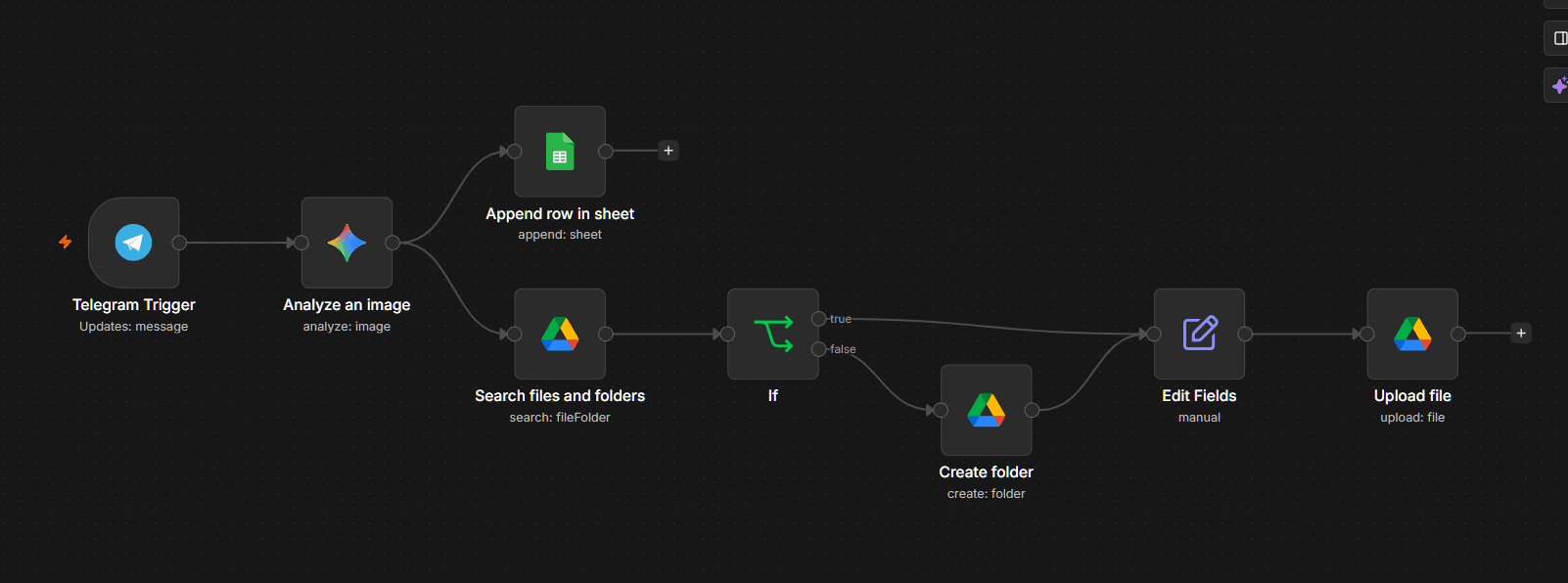
n8n Telegram Receipt Processing & Expense Logging Engine is a multimodal vision automation workflow built in n8n. It allows users to snap receipt photos from Telegram and instantly log structured financial data into Google Sheets while archiving files in Google Drive. Workflow Execution & Architecture: 1. Ingestion & Multimodal Vision Extraction: Interception via Telegram Webhook. Binary payload is passed to Google Gemini vision configured with temperature=0 and a strict JSON prompt contract (merchant_name, amount, date). 2. Expense Audit Logging: Parsed JSON data is automatically appended to a central expense tracking table in Google Sheets. 3. Binary State Bridging & Drive Archival: Searches Google Drive for a date-partitioned folder ("YYYY-MM-DD"). If missing, provisions the folder on demand. Uses an Edit Fields node to re-attach binary context across conditional branches, uploading receipts as timestamped files ("receipt_YYYY-MM-DD_HHmmss.ext").
Challenges
Solving binary payload state loss when branching across n8n conditional (If) nodes. Solved by implementing an Edit Fields bridge node to re-attach binary payload streams before Google Drive upload.
Learnings
Gained deep expertise in n8n binary data manipulation, Google Gemini multimodal vision zero-temperature prompt structuring, and idempotent cloud storage folder provisioning.
What I'd Do Differently
Temperature 0 makes the extraction deterministic, not correct. A blurry or folded receipt still returns confidently wrong values that land straight in the expense sheet with nothing flagging them. I would add a validation pass — does the amount parse, is the date plausible, does the merchant string look like a name — and push failures to a review queue instead of the ledger. The binary-payload loss I fixed with an Edit Fields bridge node was also a symptom rather than the disease: I was branching before the upload, and restructuring the order would have removed the problem instead of working around it.
Development Journey
Telegram Photo Webhook Ingestion
Receives image payloads directly from Telegram client messages.
Gemini Multimodal Data Extraction
Extracts merchant name, transaction date, and total amount with zero-temperature JSON enforcement.
Google Sheets Expense Logging
Parses JSON output and appends structured rows into expense ledger.
Idempotent Drive Archival & Binary Bridge
Re-attaches binary data via Edit Fields node and uploads timestamped receipt file into daily Drive folder.