n8n AI-Powered Email Processing Pipeline
Self-hosted workflow automation engine
Dynamic email classification model
Simultaneous logging, labeling, and storage
Prevents duplicate Gmail labels & Drive folders
About the Project
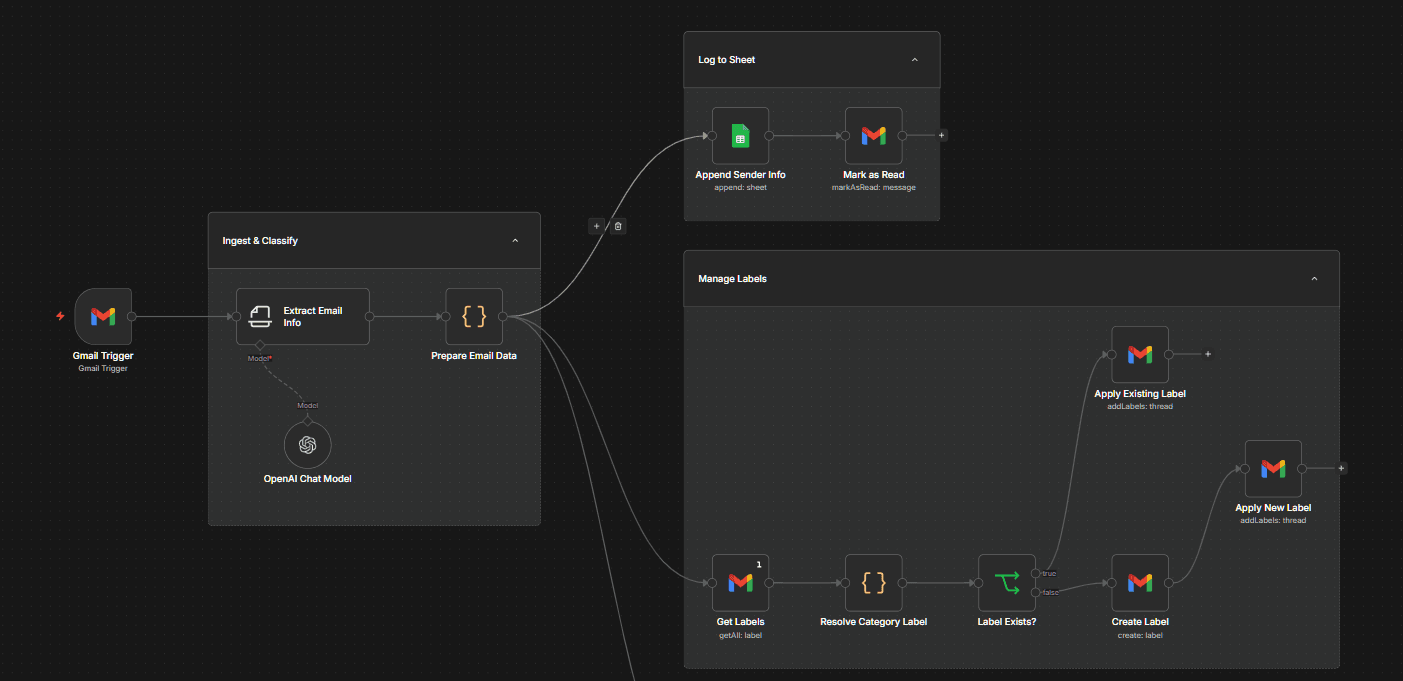
n8n AI-Powered Email Processing Pipeline is a production-grade automation workflow built in n8n demonstrating AI classification, idempotent resource management, conditional branching, and parallel Google Workspace integration. Workflow Execution & Architecture: 1. Inbound Ingestion & OpenAI Classification: Triggers on every inbound Gmail message. An OpenAI Chat Model extracts email content and assigns a category label dynamically, eliminating hardcoded rules. 2. Parallel Branch Fan-out: - Log to Sheet: Appends sender info to a Google Sheets correspondence audit log and marks the email as read in Gmail. - Manage Labels: Fetches Gmail labels, resolves category, checks if label exists, and either applies the existing label or creates a new label then applies it (idempotent). - Store Attachments: Evaluates whether attachments exist. If true, checks/provisions a sender-specific Google Drive directory and uploads attachments.
Challenges
Designing idempotent label and folder creation logic to prevent duplicate labels and directories during repeat executions required careful conditional branching. Fanning out three execution pipelines in parallel after OpenAI classification maintained high throughput and low execution latency.
Learnings
Mastered n8n workflow design, AI-driven routing, parallel branch management, and Google Workspace (Gmail, Drive, Sheets) OAuth2 API integrations.
What I'd Do Differently
Every inbound email hits the LLM classifier, which is the slowest and most expensive step in the workflow, and most mail does not need it. A cheap rules pass for the obvious cases with the model as fallback would cut both cost and latency substantially. The bigger gap is that nothing handles a classification the model gets wrong: the label is applied silently and low-confidence results are treated exactly like confident ones. I would add a confidence threshold and route anything below it to an 'unsorted' label for review rather than assuming every answer is correct.
Development Journey
Gmail Ingestion & OpenAI Routing
Listens for incoming emails and extracts categories dynamically using OpenAI.
Google Sheets Sender Logging
Appends sender data to correspondence sheet and marks message as read.
Idempotent Label Provisioning
Checks existing Gmail labels and dynamically creates or applies category tags.
Sender Directory & File Upload
Provisions sender folder in Google Drive and uploads files asynchronously.