Capstone: Braille Haptic Reader
Custom translation accuracy under varied lighting
Full image-to-haptic-pattern latency
Python scripts, YOLOv5 integration, solenoid driver loops
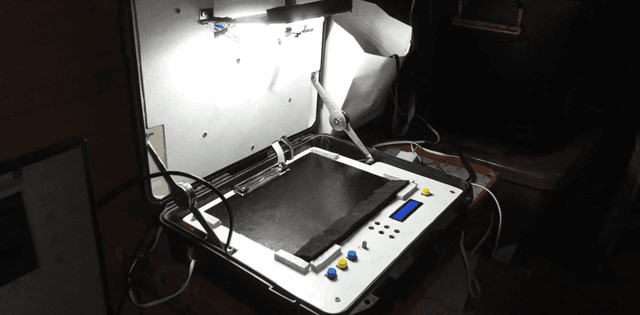
Raspberry Pi 4, high-res camera, 3D-printed haptic cell array
About the Project
As my capstone project, I developed an OCR-to-Braille translation pipeline running on a Raspberry Pi. The system uses a camera to capture text, which is then processed by a custom-trained YOLOv5-based AI model for accurate text detection. The detected text is run through an OCR engine and translated into Braille, which is then outputted to a haptic display. The system achieved a 97.82% OCR accuracy, enabling real-time translation for visually impaired users.
Challenges
Training a highly accurate text detection model for various fonts and lighting conditions was a significant challenge. Integrating the entire pipeline—camera capture, AI inference, OCR, and haptic output—on a resource-constrained device like the Raspberry Pi required extensive optimization. The real-time constraint meant every part of the process had to be as efficient as possible.
Learnings
This project taught me a great deal about the practical application of machine learning models on edge devices. I learned about optimizing deep learning models for performance, working with hardware interfaces, and building a complete, end-to-end system that serves a real-world purpose.
What I'd Do Differently
97.82% is character-level accuracy on test images I chose, and that flatters the system. For someone reading by touch, what matters is whether a line comes through intelligibly, and a single wrong character inside a word is far more disruptive than the percentage implies. I would report word-level accuracy and test with visually impaired users rather than optimising a metric I picked myself. Technically, capture, OCR and haptic output shared one thread budget and I fought the 1.2s latency head-on; decoupling capture from playback with a queue would have let the reader start feeling output before the frame finished processing.
Development Journey
Hardware Prototyping & Pin Mapping
Sourced Raspberry Pi 4 board, configured custom-designed circuit connections, and soldered 3D-printed haptic cell solenoid relays.
YOLOv5 Character Box Detections
Trained high-accuracy character and paragraph boundary detection anchors with YOLOv5 on various distinct printed fonts.
Python Braille Mapping Core Engine
Developed low-level Python scripts converting OCR string characters into 6-dot haptic grid arrays mapped directly to GPIO pin nodes.
Thread Tuning & Validation testing
Streamlined image processing threads to cut pipeline lag to ~1.2 seconds, achieving solid 97.82% overall accuracy.